Friday, January 30, 2015

Fire TV Fire Sale, Cheap Metal Detector, and More Deals

Fire TV Fire Sale, Cheap Metal Detector, and More Deals

Amazon's Fire TV streaming box is actually pretty great, and if you missed out on the multiple Black Friday deals, you can score one for $15 off today. [Amazon Fire TV, $84]


Fire TV Fire Sale, Cheap Metal Detector, and More Deals

This super-fast (90MB/sec) microSD card is only $28 today, an all-time low. [ PNY Turbo Performance 64GB High Speed MicroSDXC Class 10 UHS-1 Flash Card, $28]

Fire TV Fire Sale, Cheap Metal Detector, and More Deals

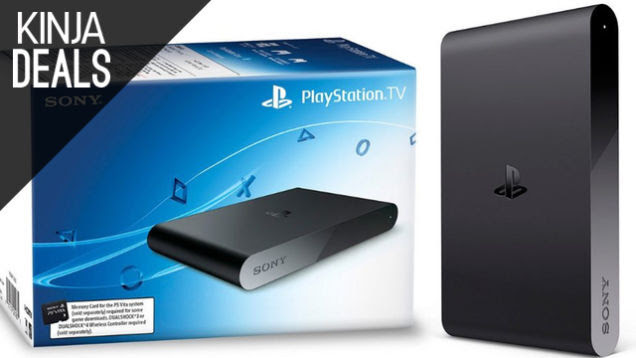
The PlayStation TV was a questionable investment when it launched at $99, but Sony's new reasonably-priced PlayStation Now subscription plans have made it a far more valuable addition to your gaming fleet. If you've been on the fence, it might be time to jump on this $60 deal.

If you have a collection of compatible Vita or PSP games lying around, this should be a no-brainer. Just add a controller and a Vita memory card, and you'll have instant access to a huge portion of Sony's back catalog on any TV in your house. [PlayStation TV, $60]

On a semi-related note, Sony's Silver wired headset for PS4, PS3, and Vita is only $35 right now. It actually won't work natively with the PlayStation TV, but if you have other Sony consoles lying around, it's worth a look.


Fire TV Fire Sale, Cheap Metal Detector, and More Deals

If you've ever been curious about treasure hunting, Amazon's #1 selling metal detector is only $56 today. It's a fairly basic model, but it'll get you started with a new hobby. [Bounty Hunter Gold Digger Metal Detector, $56]


Fire TV Fire Sale, Cheap Metal Detector, and More Deals

The HGST Touro is one of the only 7200 RPM external hard drives out there, and the 1TB model is only $60 today, which is as cheap as we've ever seen it.

If you own an Xbox One, this drive can seriously cut your games' load times vs. the internal hard drive, but any computer user who wants a little extra speed will appreciate it. [HGST TOURO S 1TB USB 3.0 High-Performance Ultra-Portable Drive, $60 with promo code EMCAKPA42]

If speed isn't a concern, you can get a different 1TB drive for $5 less. [ Toshiba Canvio Connect 1TB External USB 3.0 Hard Drive, $55]


Fire TV Fire Sale, Cheap Metal Detector, and More Deals

Any highly-rated Bluetooth speaker is worth a look at $25. The free car charger is just a bonus. Note that this code only works with the white car charger.[ Buy one Lumsing Splashproof Bluetooth Speaker, Get a Lumsing Dual-Port Car Charger FREE, $25. Add both to cart and use code SAL4LOVE]


Fire TV Fire Sale, Cheap Metal Detector, and More Deals

Samsung's new Level line of headphones have great reviews from users, and the wireless noise-canceling models are down to $236 today, the second lowest price we've ever seen. [Samsung Level Wireless Noise Canceling Headphones, $236]


Fire TV Fire Sale, Cheap Metal Detector, and More Deals

Yes, this is the year-old model of the Surface Pro, but $800 (tax-free for most) is still a terrific price for a 512GB model, especially considering you get the Type Cover for free. [Microsoft Surface Pro 2 Core i5 8GB RAM 512GB with Keyboard, $800]


Fire TV Fire Sale, Cheap Metal Detector, and More Deals

I can't say I'm familiar with this gaming keyboard and mouse combo, but it has solid reviews, and $18 is a ridiculous price. [CM Storm Devastator - LED Gaming Keyboard & Mouse Combo, $18 after $10 rebate]


Fire TV Fire Sale, Cheap Metal Detector, and More Deals

Put hot soup in this thing in the morning, eat hot soup at lunch without microwaving. [Thermos Vacuum Insulated Stainless Steel Food Container, 16-Ounce, $22]


Fire TV Fire Sale, Cheap Metal Detector, and More Deals

Need some extra juice for your phone or tablet? Take it to go.


Fire TV Fire Sale, Cheap Metal Detector, and More Deals

Catch up on any the big games you missed last year with Greenman Gaming's 2014 Revisited sale. Note that the promo code takes an extra 20% off the advertised deal prices.


Fire TV Fire Sale, Cheap Metal Detector, and More Deals

Cheaper than Apple's Lightning cable

✔ Longer than Apple's Lightning cable

✔ More...braided than Apple's Lightning cable

Tech Armor Premium Apple Certified Braided Lightning cable - 6 Feet ($12) | Amazon | Promo code TECHCABL


Fire TV Fire Sale, Cheap Metal Detector, and More Deals

We've got a pair of nice deals on great laptops today, the most impressive of which is a fully-loaded Lenovo Y40-80. $899 gets you a brand new Broadwell Core i7 processor, 512GB SSD (yeah, really), 8GB of RAM, and an AMD Radeon R9 M275 GPU. Needless to say, this should suffice for all but the most power-hungry laptop owners. [Lenovo Y40-80, $899 with code USPY4US128]

If a MacBook Air is more your style, here's an 11" Haswell model with 256GB of storage for $849, plus 6 months of Parallels Access 2.0. [11" MacBook Air 256GB SSD, $849]


Fire TV Fire Sale, Cheap Metal Detector, and More Deals

You'd think everyone who reads these deals posts would be all set on USB charging hubs by now, but they're incredibly popular every time we post them. [Inateck 30W 4-Port Desktop USB Travel Charger, $11 with code K9TGMKZY]


Fire TV Fire Sale, Cheap Metal Detector, and More Deals

It wasn't voted as one of your five favorite space heaters, but if aesthetics are important, the Dyson AM04 looks way better than the other options. [Dyson AM04 Hot+Cool, $155]


Fire TV Fire Sale, Cheap Metal Detector, and More Deals

If you own an Xbox, you might as well stock up. [Xbox Live Gold, $40]


Fire TV Fire Sale, Cheap Metal Detector, and More Deals

Want to try out a gaming mouse, without investing in something really high end? This Etekcity mouse has been popular among our readers in the past, and has terrific reviews for the price. [Etekcity Scroll X1 (M555) 2400 DPI Wired USB Optical Mouse with 7 Programmable Buttons, $12 with code GAMS5OFF]


Fire TV Fire Sale, Cheap Metal Detector, and More Deals

We've waxed poetic about Brother laser printers countless times, but if you're still fighting an old Inkjet at your house, you've got two great options to upgrade today.

Both of these printers support Google Cloud Print and AirPrint, and both use long-lasting toner cartridges, rather than expensive ink. Plus, after factoring in the gift card, both essentially cost $80. The only real difference is the scanner/copier bed on the HL-2380DW, so unless it sells out, or if you need something more compact, that's probably the one to get.

Brother HL-2380DW Wireless 3in1 Laser Printer plus $30 Gift Card ($110) | Best Buy

Brother HL-L2360DW Wireless Compact Laser Printer plus $20 Gift Card ($100) | Best Buy


Fire TV Fire Sale, Cheap Metal Detector, and More Deals

$10 in free gas is basically half a tank these days. No brainer. [ $100 Chevron Gift Card + $10 in Bonus Gas, $100]


Fire TV Fire Sale, Cheap Metal Detector, and More Deals

Facebook

We're in the process of ramping up our Facebook content, and we'd love if you liked us and told your friends to do the same. We promise to put things that you actually want to see in your news feed.


Tech


Storage

Power

Headphones

Home Theater

Computers & Accessories

PC Parts

Phones and Tablets

Photography


Inventory


Home

Kitchen

Fitness

Camping & Outdoors

Auto

Kids

Apparel

Bonus


Media


Movies & TV

Books & Magazines

Apps

Gaming


We work together with you to find the best products and the best deals on them, click here to learn more. We operate independently of Editorial and Advertising, and if you take advantage of an item we cover, we may get a small share of the sale. We want your feedback.

The Money Moves to Stop Procrastinating and Take Care of Now 

The Money Moves to Stop Procrastinating and Take Care of Now 

Fifty-four percent of Americans planned on making a financial resolution for 2015. According to a new poll by GOBankingRates, saving money, paying down debt and improving spending continue to top the list. Given only 8 percent of people actually achieve their resolutions, it might be time to change things up a bit.

This post originally appeared at GOBankingRates.

Here are seven things you can do this month to positively impact your finances all year.

Finally Create a Budget

Making a resolution to just spend less is too vague — you'll never be able to spend less if you don't know what you are spending in the first place.

Instead, make a commitment to learn to stick to a budget. The good thing about budgets is that they are flexible — the budget you set in January is going to be very different than what you end up with in December. Life has a tendency to throw curve balls and your budget will change as your life does, so don't get too locked into the idea you have to stick to your first shot. Successful budgeters know it takes time to find a system that works, so use the entire year to perfect your budgeting skills.

See a Certified Financial Planner

Even if you don't have a lot of money to save or invest, the benefits of seeing a certified financial planner (CFP) outweigh the costs. A good planner will examine your financial picture, discuss your goals and help you come up with a long-term financial game plan.

CFPs are often confused for investment advisors; investment advisors recommend investment products and manage portfolios, while CFPs take a broader look at your finances and offer advice on budgeting, debt, tax planning, saving and more. A Certified Financial Planner can also assist with estate planning, which leads me to…

Establish an Estate Plan

Think you aren't old enough or wealthy enough for estate planning? Think again. If you have a spouse, children, elderly parents, own your own home, a savings account or investments, then you need to establish an estate plan.

Estate planning involves everything from creating an advance health care directive to designating a guardian for your children to adding beneficiaries to your insurance policies.

When someone doesn't do estate planning and then they pass away, their family winds up in probate court, which is expensive and time consuming. LegalZoom estimates that probate costs American families $2 billion a year — $1.5 billion of which goes to attorneys' fees alone. Estate planning will save your loved ones any additional grief and ensure your wishes are carried out as you intended.

Buy Life Insurance

If you passed away today, would your loved ones be able to survive financially? Would the mortgage get paid? Who would support your children? Who would pay for your funeral? A life insurance settlement can replace your income, help payoff debts, support surviving family members, pay for a child's education or even cover funeral costs. Life insurance doesn't eliminate the struggle all families deal with when someone passes away, but it helps financially care for your loved ones when you can't.

Repair Your Credit

Your credit score determines everything from whether you can get a car loan, qualify for a mortgage or rent an apartment, so make 2015 the year you get your credit in tip-top shape.

Healthy credit reports and scores can save you thousands in interest and improve your overall financial picture. Pull your free yearly credit reports from the major three credit bureaus at annualcreditreport.com so you know where you stand, and then make a plan for how you will improve in the coming year. It takes time to rebuild credit and there are many factors that go into your scores; here's a helpful guide on how to get started.

Rebalance Your Portfolio

If you ignored your investments and/or retirement accounts all year, then the very least you should do to make up for it is rebalance in beginning of the new year.

Your portfolio consists of weights in different asset classes and over the course of the year, the market value of each investment earned a different return, which shifted the weight. Rebalancing is essentially giving your portfolio a tune-up — you shift the weight to keep your risk low and maximize returns. The optimum balance in a portfolio is unique to each individual investor, and if you aren't comfortable analyzing your portfolio on your own, then consult an investment advisor for help.

Use Tax-Advantaged Accounts

If you aren't taking advantage of the many tax-advantaged accounts at your disposal, then you're missing out on big savings in 2015.

The most popular tax advantaged accounts include a 401(k), IRA and Health Savings Account. These accounts allow you to enjoy tax-deferred or tax-free growth of your money. Tax deferral leads to significant savings over time and in some cases, pre-tax contributions can lower your taxable income. Talk to your employer about starting contributions in 2015 (if you are self-employed, you still have plenty of tax-advantaged accounts to choose from).


Two Cents is a new blog from Lifehacker all about personal finance. Follow us on Twitter here.

Modify an IKEA Stool into a Simple Bike Stand

Modify an IKEA Stool into a Simple Bike Stand

Keep your bike secure in your home and off the streets with this simple modification of the IKEA Frosta Stool.

Lifting bikes onto ceiling hooks or hanging them on the wall isn't a good storage option for everyone. Kickstands are also not an ideal solution as your bike can easily tip over.

This IKEA hack turns a $15 Frosta Stool on it's end and, after a basic modification of the legs, you have a simple bike stand that you can convert back to a stool when needed. Check out the full post at IKEA Hackers for more info.

Frosta Bike Stand | IKEA Hackers

Wash Grapes Quickly With Baking Soda and Salt 

Wash Grapes Quickly With Baking Soda and Salt 

You should obviously wash your grapes before eating them, but it can be a small pain to make sure each one is clean. To make the process quicker, wash them with baking soda and salt.

It's not like washing grapes is that difficult, but sometimes it seems like too much work for the payoff. Because of this, I'll often haphazardly rinse my grapes and tell myself they're clean, only to ingest the bitter residue that's still coating many of them. If you're lazy like me, check out Nature Nurture's simple way to make sure all of your grapes get cleaned:

First, remove the grapes from the stem, give them a quick rinse, and place them in a wide, shallow bowl. Then sprinkle about 1-2 teaspoons of salt on the grapes. Sprinkle another 1-2 teaspoons of baking soda on there. Then grab the bowl and shake it vigorously from side to side and front to back, for about 30 seconds to a minute...Finally, rinse very well under cold water.

It's a lot easier than rubbing each individual grape, and it's a lot more thorough than casually rinsing them and eating the waxy coating of pesticide and dirt. To check out the full post, use the link below.

HOW TO: Wash Grapes The Right Way | Nature's Nurture Blog

Photo by Sylvie F.

Bring Out 'Yer Dead On Today's Open Thread

Lifehacker Faceoff: The Best Password Managers, Compared

Lifehacker Faceoff: The Best Password Managers, Compared

You have a ton of options for password managers, but when it comes to your security, you want the best possible tool for the job. Let's take a look at some of the most popular password managers and compare them side-by-side so you can pick the one that's right for you.

Considering the security required for a password manager, you have a surprising amount of choices here. We spent some time with all of them, then picked the following five because they hit the sweet spot between reliability, features, security, and support (and not surprisingly, the best five were the the ones you all voted for in our last poll). That said, we'll talk about some of the other options at the end too. With that, let's start by taking a look at the the basic feature set of our top five:

Lifehacker Faceoff: The Best Password Managers, Compared

Click the expand button above for a closer look.

Features aren't everything, though. It's also about usability, support, and security. To keep things short, let's start by talking about the basics that each of these password managers have:

  • Password generation: The only secure password is one you can't remember, and you need a different one for every account you use—which means a password generator comes in really handy. So, all of the password managers on this list will do that for you when you sign up for a new account on a web site.
  • Form filling: Every password manager here will also fill out your name, address, and other information automatically on other sites. It isn't specifically related to passwords, but hey, it's super handy.
  • Secure password sharing: Each of the password managers here support sharing passwords securely with other people. They each do things a little differently, but if you need to share a password with a co-worker or family member, this feature is one of the easiest (and most secure) ways to do so.
  • Secure Notes: If you want to store extra passwords for Wi-Fi networks or any personally identifiable information, all of these password managers include a secure notes section.

With that, let's take a look at how each of these password managers differs to help you pick the one that's right for you.

LastPass

Lifehacker Faceoff: The Best Password Managers, Compared

LastPass has long been a household favorite here at Lifehacker, but that doesn't necessarily mean it's the best manager for you. Let's take a quick run through its feature set:

  • Browser extensions and a dedicated Mac app: With browser extensions, you can use LastPass with just about any browser out there, without the need for an extra app on your computer. Once you get it set up, your login and password information are saved securely on LastPass's servers, and you can access them from any computer on which you have the extension installed. The Mac app adds a few more features to the extensions, including a faster search and a better way to browse your passwords outside your browser.
  • Mobile apps: If you do a lot of browsing on your phone or tablet, you can take your LastPass passwords with you. The apps themselves are free, but they require a LastPass Premium account ($12/year) to actually use. LastPass is available on Android and iOS like everything else on this list, but you can also get it on Windows Phone and Blackberry.
  • Password audits: LastPass will scan your vault to check for weak passwords and help you create more secure ones. It'll also show you a nice score on the screen so you can quickly see how strong the bulk of your passwords are.
  • Automatic password changes: After a site gets hacked, it's generally advisable to change your password to that service (and any other service on which you used the same password). LastPass keeps a database of hacks around the web and will alert you when you have an account that's been compromised. From there, you can change your password with just a click.
  • Two-factor authentication: LastPass supports two-factor authentication through services like Google Authenticator, Grid, YubiKey, and more.

Where LastPass fails: LastPass is free if you're only using it on your computers, but the extra features and mobile apps do cost $12/year. That might sound like a lot over the course of your life, but with a subscription system you're more likely to get more features and better support over the years. That said, even after a much needed update, the interface is still a bit clunky, and it takes a while to get the hang of. Likewise, since LastPass stores your (encrypted) passwords it the cloud, which some might not be comfortable with, but they've done so in a way that's quite secure and keeps them safe from hackers. However, LastPass has been very good about notifying users immediately if something happens, and if you have two-factor authentication on you should be safe in the case of any password breaches.

Who LastPass is for: LastPass is a great all-around solution for people who just want to keep their passwords safe. It has enough advanced features, even in the free version, to make it worthwhile for most power users. LastPass' real appeal, though iis the fact that anyone can get started using it really quickly (provided they can navigate the clunky UI). With the exception of mobile access, most of LastPass' best features are available for free, so if you don't need to get your passwords on the go, it's easily your best option. LastPass also has the widest mobile support of all the password managers, with apps on Android, iOS, Windows Phone, and Blackberry, so if you're not an Android or iOS user, it's your best bet.

Dashlane

Lifehacker Faceoff: The Best Password Managers, Compared

Where LastPass fails a bit in basic interface, Dashlane truly excels. It's packed with a ton of features and is incredibly easy to use, even if you're not the most computer savvy person out there. Here's what you'll get with Dashlane:

  • Browser extensions, Windows and Mac apps: Dashlane works primarily from its desktop apps, but browser extensions allow you to integrate that data into your browser too. This means that you can set up Dashlane to store your data and sync online if you want, or keep it locally if you don't want those passwords going anywhere. Unlike LastPass, you'll need the Windows or Mac apps installed to use the browser extensions.
  • Mobile apps: If you want to use the free mobile apps, you'll have to shell out for a subscription. Dashlane's is a $40/year.
  • Password audits: Dashlane has a handy security score screen where you can check for weak or duplicate passwords, then automatically change them in a click if a hack is reported. Likewise, Dashlane will alert you if a security breach is reported.
  • Automatic password changes: One of Dashlane's more killer features is the Password Changer. Just log into your Dashlane account, click the checkboxes next to any passwords you want to change, and Dashlane will automatically change them on each individual site, all at once.
  • Two-factor authentication: Dashlane supports two-factor authentication through Google Authenticator.
  • Digital Wallet: Dashlane's digital wallet stores all your credit card information, then automatically saves receipts and screenshots of your online purchases. If you're using the mobile apps, that information goes with you too.

Where Dashlane fails: If you want features like syncing and web access to passwords, Dashlane very pricey at $39.99/year. However, you do get a lot of bang for your buck, and the app's constantly being updated with new features and security improvements.

Who Dashlane is for: If you're willing to pay the $39.99/year for Dashlane, it's definitely one of the simplest to use password managers out there. The breach notifications, consistent UI, and range of features makes it a better entry-level password manager than LastPass if you're willing to shell out the cash. The automated, bulk password changes also make it a great choice for anyone who doesn't want to spend the time changing passwords.

KeePass

Lifehacker Faceoff: The Best Password Managers, Compared

KeePass is the only truly free option that's any good, and it's also open source, which is immediately appealing to a lot of people. That said, KeePass works a lot differently than some of the more modern options. KeePass stores all your passwords locally, and doesn't have a syncing service—though you can sync your passwords through Dropbox with a plug-in. Beyond that, it's feature set it drastically different than your other options.

  • Official Windows, Mac, and Linux apps: KeePass is officially available on Windows, Mac, and Linux. It integrates with your system to fill out passwords not just online, but everywhere else on your computer as well. KeePassX is a clone that alters the look and feel of the original a bit, if you're looking for something different.
  • Unofficial mobile apps: Officially, the KeePass team doesn't make any mobile apps, but since it's open source, other people have. You can find a massive list of various ports for iOS, Android, Blackberry, and more here. Just remember, you'll need to manually sync your passwords to your mobile device, since KeePass won't do it for you.
  • Portability: KeePass doesn't require installation on your system, which means you can carry it around on a USB stick from computer to computer easily.
  • Plug-ins add tons of features: Besides being free and open source, the truly unique thing about KeePass is the support for plug-ins. With them, you can completely alter how KeePass works. This includes adding syncing through service like Google Drive or Dropbox, adding enhanced search, creating password strength reports, and more.

Where KeePass fails: KeePass is a decidedly more hands-on password manager than the other options here, which means it's not as dead simple as something like Dashlane. Which is to say, it'd be hard to recommend KeePass to anyone who isn't computer literate, even though it is the only truly free option. KeePass also doesn't have the handy security alerts and automatic password changing features of some of the other paid options.

Who KeePass is for: If you're willing to put in the effort to set it up, KeePass is incredibly powerful and well supported. Since it offers offline access and gives you complete control of your encrypted passwords, it's perfect for anyone who doesn't want to keep their data stored on a third-party server, too. If you're the tinkering type who likes to really customize your software, KeePass is definitely worth trying.

1Password

Lifehacker Faceoff: The Best Password Managers, Compared

Like LastPass and Dashlane, 1Password takes the "simple is better" approach to a password manager and sports the best looking software suite of the bunch. While it might look the same as everything else at a glance, it has its own special twist on the password manager that's going to appeal to some more than others. It includes:

  • Windows and Mac apps, with integrated browser extensions: 1Password works similarly to Dashlane: you need the desktop app installed, but you can easily integrate it into your browser with extensions for Chrome, Firefox, Safari, and Opera. The nice thing about 1Password is the fact you can use it locally only, or sync to the web if you want to use it across devices. You can sync through Dropbox, iCloud, Wi-Fi, or shared network folders. You'll need to download a single license of the desktop apps for a one-time fee of $50.
  • Mobile apps: 1Password has free apps available on iOS and Android. Uniquely, you can download and use these apps without the desktop companion for free, but you won't get the syncing features.
  • Password audits: 1Password will take a look at all your existing passwords, then audit them for duplicates, weak passwords, and old passwords. More importantly, the Watchtower service will monitor your passwords and alert you to any breaches that require you to change your password right away.
  • Two-factor authentication: Instead of supporting a variety of two-factor authentication services, 1Password acts as it's own authenticator if you're a paid user of the apps. This allows you to generate one-time passwords for a variety of services. It does not support two-factor authentication to access your 1Password account, though, which is a pretty big downside.
  • Digital wallet: 1Password includes a digital wallet that organizes and securely stores any personal information you want. You can set it up to store credit cards, IDs, social security numbers, and just about anything else.

Where 1Password fails: While it's the only password manager on here that offers a one-time payment option, the $50 entry fee to use 1Password is a bit high for some people. Thankfully, there is a demo available if you just want to check it out. While most people are only using Windows, Mac, iOS, and Android, the lack of support for other operating systems does limit its usage a little. The lack of a two-factor authentication method is also a pretty big security hole and a major downside over your other options.

Who 1Password is for: If you're a fan of good design, 1Password is easily the best looking password manager on this list. More importantly though, it's constantly getting updates and new features, so you know that your $50 is well spent. If the thought of paying an annual subscription for Dashlane or LastPass is a turn off, 1Password's the way to go.

Roboform

Lifehacker Faceoff: The Best Password Managers, Compared

Roboform has been around for a long time, and while it's not the most innovative password manager out there, it does its primary job very well. It has:

  • Windows, Mac, and Linux apps: Roboform is available on all the major platforms, including on a USB stick, which makes it easy to transfer from computer to computer. The apps themselves integrate right into Chrome, Firefox, Internet Explorer, and Safari. Like 1Password, you can sync your password in the cloud or store your passwords locally only.
  • Mobile apps: Roboform is available for Android, iOS, and Windows Phone for free.
  • Start page: If you tend to log into the same sites every day, Roboform has a handy start page where you can easily log into a bunch of different sites at once.

Where Roboform fails: Roboform is easily the least feature-packed on this list, and at $9.95/the first year and $19.95/every year after, it's hard to justify why you'd pick Roboform over something like LastPass. However, Roboform has been around a long time and has a incredibly good history of solid security. For a password manager, that's a very important thing.

Who Roboform is for: Roboform's lack of advanced features have one very specific advantage: it's incredibly easy to use. It generates passwords, logs you into sites, and that's it. There's no extra fluff, no wasting time checking password security (assuming you're already up to snuff), or anything else. If you've been using strong passwords for a while, Roboform is a nice, barebones option that does just what it's supposed to do and nothing else.

Other, Lesser-Known Options

As we mentioned at the start of this post, there are a ton of different password managers in existence. Most don't stray too far from the feature set of the above five though, and often get held back by pricing models or platform availability. That said, if none of the above work for you, these may be worth checking out:

  • Password Safe: Password Safe was created with the help of security technologist Bruce Schneier, so you know it's one of the most secure password managers out there. As these things tend to go, that comes at the cost of convenience. Password Safe is only available on Windows, and it doesn't integrate with browsers. Heck, it doesn't even create passwords for you, it's simply a vault. But it's a very secure vault.
  • Keeper: Keeper does the basics of a password manager and adds in a handy file vault as well. The pricing is a bit on the higher side though, with a single device costing $10/year and multiple devices running you $30/year.
  • PasswordBox: PasswordBox is a free password manager that has all the features you'd expect, but it's hard to recommend at the moment as they're in a transitional period after being bought out by Intel Security. On paper, that sounds like a good thing, but it's difficult to gauge what software support will be like from here on out.

Whichever one you pick, just remember, it doesn't really matter which you chose, but pick one. If you aren't using a password manager, you're more vulnerable than you think.

Photo by Sergay Nivens.

Write Your First Draft Like No One Will Read It To Beat Writer’s Block

Write Your First Draft Like No One Will Read It To Beat Writer’s Block

Writer's block happens for many reasons, but fear of reader judgement is a big one. To overcome this, write your first draft for no one but yourself.

In the New Writer's Handbook, Erica Jong explains:

All writing problems are psychological problems. Blocks usually stem from the fear of being judged. If you imagine the world listening, you'll never write a line. That's why privacy is so important. You should write first drafts as if they will never be shown to anyone.

Since reading this quote, I've taken the advice, and it's helped tremendously. It's a lot easier to get started and actually produce something when I'm not worried about how my writing will be nitpicked.

It also helps to remember I'll be allowed to consider reader judgement during the second draft. When I edit, I do imagine how the reader will perceive the text. The first draft, though, is just for me.

Check out the book itself at the link below.

The New Writer's Handbook: Volume 2: A Practical Anthology of Best Advice for Your Craft and Career (New Writer's Handbook: A Practical Anthology of Best Advice for Your Craft & Career)

Photo by Ed Yourdon.